 Job Sift
Chrome extension for Upwork™ freelancers
Skip the jobs you’d never apply to.
Job Sift folds Upwork jobs from unverified clients, countries you don’t work with, or keywords you block into one line that says why. One click brings any job back. Nothing leaves your browser.
The filters Upwork doesn’t have.
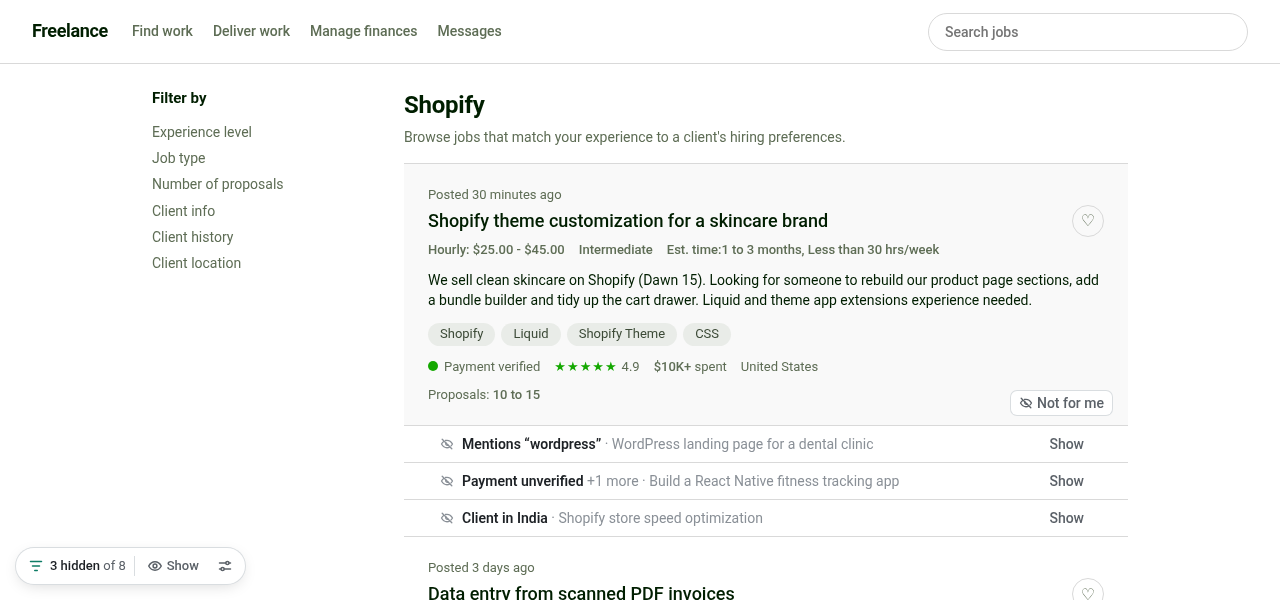
Upwork lets you pick countries to include, not ones to skip, and has no way to hide clients who haven’t verified payment or jobs that mention the stack you don’t do. Job Sift adds those, right on the feed.
Folded, not lost
Hidden jobs shrink to a one-line bar with the reason and a Show button. Or remove them entirely, your choice.
Countries and keywords
Block client locations and words like “wordpress” or “unpaid test”. Whole-word matching that ignores case and accents.
Your bar, with Pro
Client spend and rating, proposals, hourly rate, fixed budget, experience level and job age. Set it once.
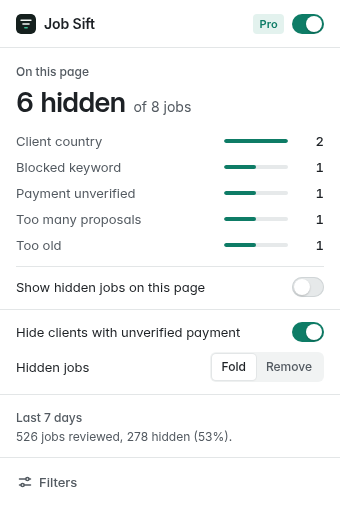
- Every hidden job says why“Payment unverified”, “Client spent $50 (under $1K)”, “20 to 50 proposals”. No black box, no guessing.
- Missing details never hide a jobIf a card doesn’t show a client’s rating or budget, that filter simply doesn’t apply. You won’t lose good jobs to gaps.
- “Not for me” on any cardHide one job for good with a click, and undo it just as fast.
- Never touches your accountJob Sift doesn’t click, apply, bid, refresh or message for you. It only changes how cards look in your own browser.
Free for the basics. Pro when your Connects count.
Pro is billed through Whop. Both plans start with 14 days free and you can cancel anytime.
Free
$0
Forever
- Hide unverified-payment clients
- Up to 3 countries and 5 keywords
- “Not for me” with Undo
- Reason on every hidden job
Pro monthly
$4 / month
14 days free
- Unlimited countries and keywords
- Client spend and rating floors
- Proposals, rate, budget, level, age
- Must-have and highlight words
Pro yearly Save 39%
$29 / year
14 days free · about $2.42 a month
- Everything in Pro
- Activity breakdown by reason
- One license, up to 3 browsers
- Priority email support
After checkout your license key appears in your Whop orders. Paste it into Job Sift → Filters → Plan.
Questions
Which Upwork pages does it work on?
Job feeds under upwork.com/nx/: Best Matches, Most Recent, U.S. Only and job search results, including jobs that load as you scroll.
Can this get my Upwork account in trouble?
Job Sift doesn’t automate anything. It never clicks, applies, bids, refreshes pages or sends messages, and it makes no requests to Upwork. It only changes how job cards look in your browser, like a reading aid.
What permissions does it need?
Only storage and access to upwork.com/nx/ pages. What you see on Upwork never leaves your browser.
Why wasn’t a job hidden?
A filter only applies when the job card shows the detail it needs. If Upwork doesn’t show a client’s rating or a budget on the card, that rule is skipped for that job on purpose.
How do I cancel?
Open your Whop orders, choose Job Sift Pro and cancel. Pro stays on until the end of the period you paid for.
Can I use one license on several computers?
Yes, on up to 3 browsers. To move it, remove the key in Filters → Plan on the old browser first.